
If you're a sparky, plumber or builder, a lot of your work probably comes from word of mouth. But word of mouth still ends with a Google search. When someone is recommended to you, they look you up before they call, and if they find nothing, or a site that looks abandoned, that recommendation can turn into a maybe.
Your website doesn't need to be fancy. It needs to make it easy to trust you and easy to get in touch. Here's what a good electrician or tradie website does, and the mistakes I see over and over.
1. Your number on every screen
Many of your customers have a problem right now: a power outage, a tripping switch, a burning smell. They're on their phone and they want to call someone.
Your phone number should be a tap-to-call button in the header of every page. On phones, a bar with Call and Get a quote buttons should stay pinned to the bottom of the screen, so nobody has to scroll to reach you. If you do emergency work, say so clearly at the top.
2. Licence and insurance up front
Careful customers look for your licence before they look at anything else. Show your licence number, your insurance and any guarantees clearly, near the top of the homepage and in the footer of every page.
In NSW there are rules about showing contractor licence numbers in advertising, so check NSW Fair Trading's current requirements for your trade. Either way, it's one of the easiest trust signals you can add, and one of the most commonly missing.
3. A quote form that asks the right questions
A form that only asks for a name and a message means every enquiry needs a follow-up call just to understand the job. A better form asks for:
- Job type: switchboard upgrade, lighting, EV charger, fault finding and so on
- Property type: house, apartment, strata or commercial
- Urgency: emergency, this week, or planning ahead
- Suburb: so you know straight away whether it's in your area
- Photos: optional, but a photo of the switchboard saves a lot of guesswork
You know what you're walking into before you call back, and you can often give a rough price on the first call. Keep it short, though. A few taps is fine. A twenty-field form gets abandoned.
4. Pages for the jobs and suburbs you want
One generic "Services" page won't rank for much. People search for specific jobs in specific places: "switchboard upgrade Randwick" or "electrician Bondi Junction".
Give each main service its own page, especially the jobs you want more of. Then add pages for the suburbs you actually service, each written properly with local jobs and details, so they help you rank without looking like copy and paste.
I set up the on-page SEO basics on every site: page titles, meta descriptions, headings, image alt text, a sitemap, schema markup (including your business details and licence) and Google Search Console. Your Google Business Profile and reviews matter a lot for local search too. I don't run ads or ongoing SEO campaigns, but this gives you a solid foundation.
5. Proof of good work
Photos of real jobs beat stock images every time. Before and afters are especially powerful for trades: an old fuse board next to a new safety-switch board shows the value of the work instantly.
Make it easy to add new jobs, with a few photos and a short note on what you did and where. If you're adding them yourself, it should take a couple of minutes from your phone. I can set your site up with WordPress so you can do that, or you can send photos to me and I'll add them. There's more on both options in Website hosting explained.
6. Reviews where people decide
Your best reviews shouldn't be buried on a separate page nobody visits. Put a few short ones next to your call and quote buttons, where people are making up their minds, and link to your full Google reviews.
7. Fast on a phone
Almost every urgent enquiry comes from a phone, often on patchy mobile data. The site needs to load fast, the text needs to be readable without zooming, and the buttons need to be big enough for a thumb. An old site that doesn't work properly on a phone costs you jobs without you ever knowing.
The mistakes I see most often
When I looked through dozens of independent business websites around Bondi, Coogee and Randwick, the tradies behind them clearly did good work. Their websites often let them down:
- Phone numbers hidden in the footer or cut off on small screens
- No licence number anywhere on the site
- Contact forms that only ask for a name and message, so every enquiry needs a follow-up call just to understand the job
- One generic services page instead of pages for the jobs you actually want more of
- No photos of real work, or the same three stock images every other tradie uses
- Sites built years ago that don't work properly on a phone, which is where every urgent enquiry comes from
A real example: MM Projects
MM Projects is a small Sydney building company run by two directors who are still on the tools. Until recently, the business lived almost entirely on Instagram. I designed and built their website, and wrote the copy and SEO.
A few of the ideas above in action:
- A projects portfolio tagged by type and suburb, with a detail view for every job
- Service descriptions written around the questions homeowners actually ask
- A short enquiry form that asks for a rough idea and a suburb, and nothing more
- The NSW licence shown on the site and included in the structured data for Google
See the MM Projects case study →
See it working
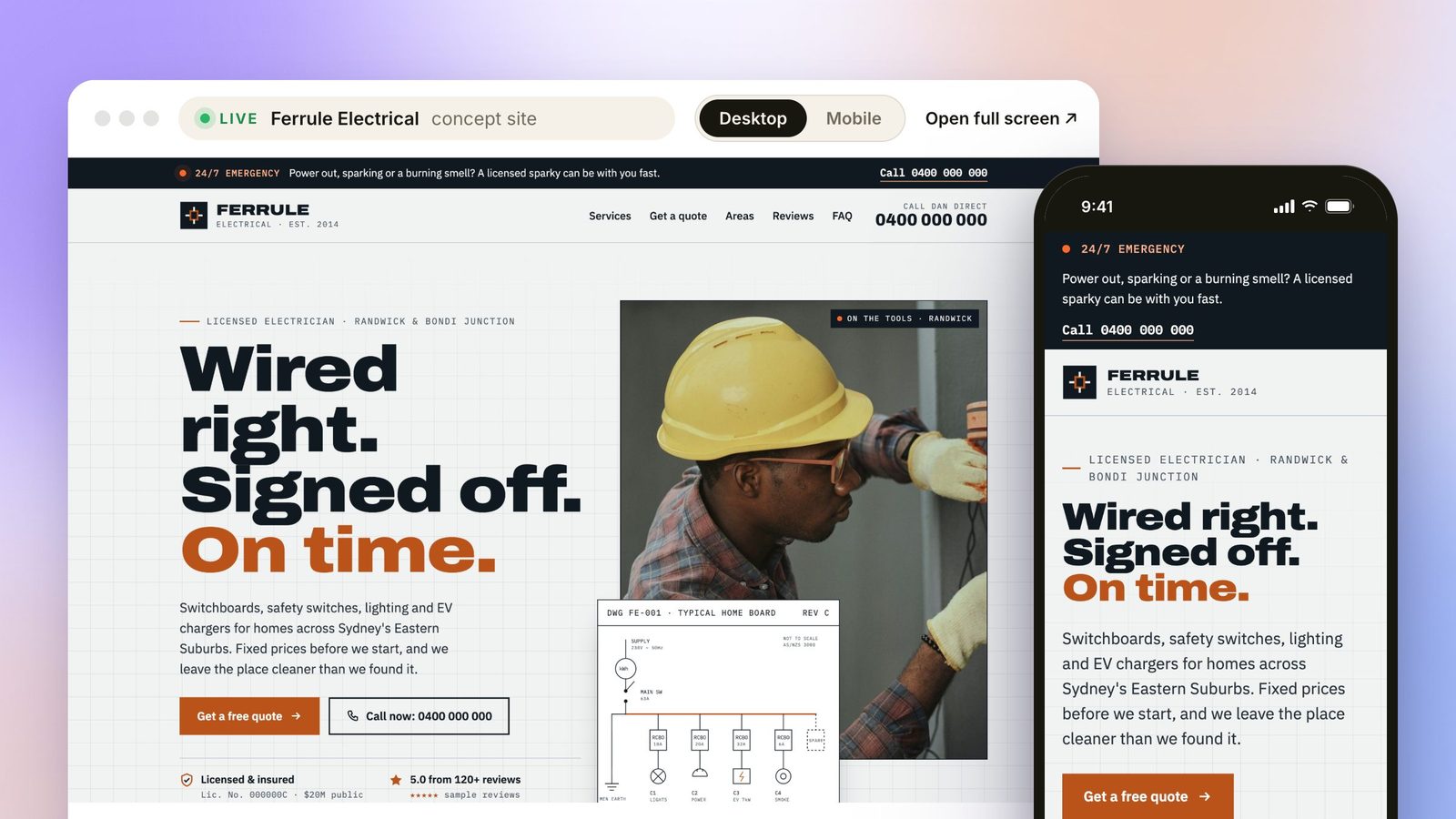
I also designed Ferrule Electrical, a fictional electrician in Randwick, to show what a modern trade website can do. It's a concept, not a real business, but it runs live on my electrician websites page. You can build a quote, drag between an old and new switchboard, and switch to mobile to see the Call and Quote bar stay on screen.
Custom websites start from $1,500, and extras like more service or suburb pages are quoted up front before anything starts.
Try the Ferrule Electrical demo →
Want a website that makes your phone ring? Tell me about your business.
Start a conversation →Personal reply within 24 hours, always from me.
Chloe, Coco Creatives. Sydney web designer with 8 years in web design and branding. I design and build every site myself, from our first chat through to handover.