
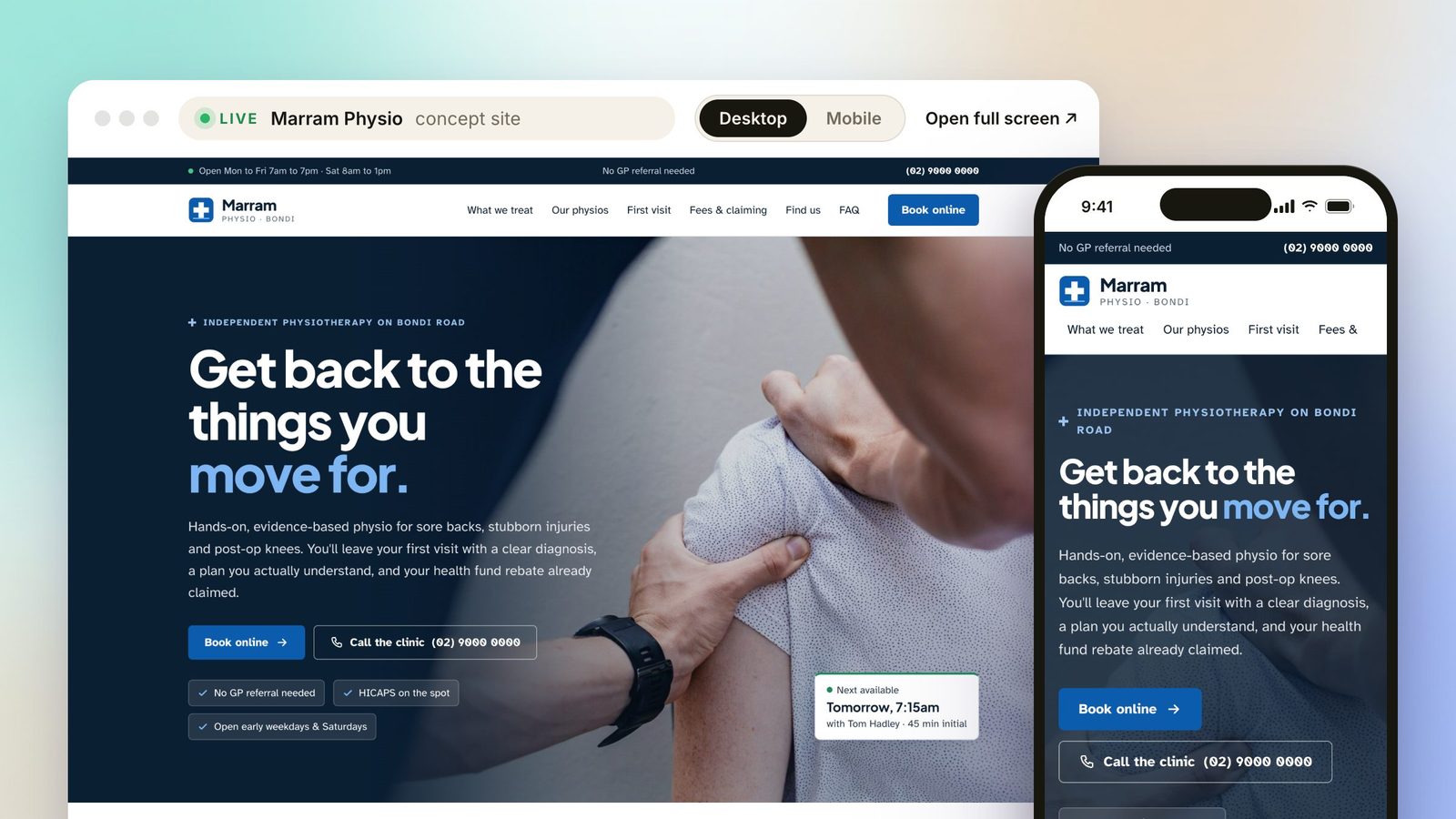
Most people find a physio in one of two ways: a recommendation, or a search for something like "physio near me" while their back is aching. Either way, they end up on your website, usually on a phone, and they decide in a few seconds whether to book or keep looking.
Your clinic might be brilliant. Your reviews might be glowing. But if the website makes booking hard, a new patient will book with the clinic down the road instead. Here's what a physio website needs to do its job, and the mistakes I see most often.
1. Online booking on the first screen
This is the single biggest thing. A new patient should be able to book without scrolling, hunting through a menu or phoning during business hours.
That means a clear Book online button in the first screen of the homepage, and a booking bar that stays on screen as people scroll on their phone. The button should go straight to your real availability in the system you already use, whether that's Cliniko, Nookal, Halaxy, Jane or something similar. Most practice systems give you a booking link or widget, so there's no need to change how your front desk works.
A phone number next to it helps too. Some patients, especially older ones or people with a complicated injury, would rather talk to someone first.
2. Practitioner profiles patients can choose from
People book the person, not just the clinic. A good profile for each physio includes:
- A real, friendly photo
- Qualifications and registration
- Special interests, like sports injuries, pelvic health, post-surgery rehab or headaches
- A line or two in their own voice about how they work
- A "Book with" button that takes patients straight to that practitioner's availability
This helps patients choose the right person, and it spreads bookings across your team instead of everyone asking for whoever's name they recognise.
3. Fees and claiming, spelled out
"How much is it?" and "Can I claim it?" are the questions reception answers all day. Put the answers on the website, clearly, so patients don't have to call.
A good fees page covers:
- Consult fees for initial and standard appointments
- Private health: whether you have HICAPS so patients can claim on the spot
- Medicare: how chronic condition referrals from a GP work at your clinic (many people still call these CDM or EPC plans)
- DVA, NDIS and WorkCover: whether you see these patients, and what they need to bring
- Whether a GP referral is needed (for most private patients, it isn't)
Keep it in plain text on a page, not a PDF or an image, so it reads well on a phone and Google can see it.
4. Condition pages that help you get found
When someone searches, they usually search for what hurts: "lower back pain physio Bondi" or "knee rehab Randwick". A single "Services" page listing twenty conditions won't rank for much.
Individual pages for your main conditions and treatments (back and neck pain, knee injuries, pelvic health, sports injuries, post-op rehab and so on) give Google something specific to show. Each one should explain the problem in plain English, what treatment with you looks like, and end with a way to book.
I set up the on-page SEO basics on every site: page titles, meta descriptions, headings, alt text, schema markup, a sitemap and Google Search Console. Your Google Business Profile and reviews do the rest of the work for local search, and I'll show you how to set those up well. I don't run ads or ongoing SEO campaigns, but a site built this way gives you a solid foundation.
5. Trust at a glance
Patients are trusting you with their body. Give them reasons to feel confident:
- Real photos of your team and treatment rooms, not stock images of a stranger's spine
- APA membership and professional registration
- How long you've been in the area
- Clear location, parking and accessibility information
- Opening hours that are actually current
A note on reviews: health practitioners have specific advertising rules around testimonials, so check Ahpra's current advertising guidelines before putting patient reviews on your site. Linking to your Google reviews, and letting your team, rooms and qualifications speak for themselves, is often the safer approach.
6. Built for phones first
Most of your new patients will see your site on a phone, often while they're in pain and short on patience. The site needs to load quickly, the text needs to be readable without zooming, and the Book and Call buttons need to be reachable with a thumb.
7. Easy to keep up to date
Clinics change: new physios join, hours shift, fees go up. Your site needs to keep up without it becoming a project every time. There are two ways I set this up. Either you send me the change and I make it, or I set the site up with WordPress so reception can update hours, fees and practitioner profiles themselves. I've written about both in Website hosting explained.
The mistakes I see most often
I recently looked through dozens of independent business websites around Bondi, Coogee and Randwick. The clinics were good at what they do. The same few website problems kept coming up:
- No Book button on the first screen, so new patients have to hunt for it or phone during business hours
- Footers still saying 2016, 2019 or 2020, which makes people wonder if the clinic is still open
- Slideshows with text baked into the images: unreadable on a phone and invisible to Google
- Pages that scroll sideways or squash text into one-word lines on a phone
- Stock photos instead of the team and the treatment rooms
- Old COVID and "we're moving" notices still sitting at the top of the homepage
Most of these are quick to fix, and fixing them makes a real difference to how a clinic comes across.
Quick checklist
- Book online button on the first screen, linked to your practice system
- A profile for every practitioner, with a "Book with" button
- Fees, HICAPS, health funds, Medicare, DVA, NDIS and WorkCover explained
- A page for each main condition you treat
- Real photos of your team and rooms
- Current hours, location and parking details
- Fast and easy to use on a phone
- A simple way to keep it up to date
See it working
To show what this looks like in practice, I designed Marram Physio, a fictional concept clinic in Bondi. It's not a real business, but it's a fully working site running live on my physio websites page. You can tap the body map to find a condition, press "Book with" on a practitioner, and switch to mobile to see the booking bar stay on screen.
Custom websites start from $1,500, and anything beyond that, like extra condition pages or practitioners, is quoted up front before anything starts.
Want a website that helps fill your diary? Tell me about your clinic.
Start a conversation →Personal reply within 24 hours, always from me.
Chloe, Coco Creatives. Sydney web designer with 8 years in web design and branding. I design and build every site myself, from our first chat through to handover.